


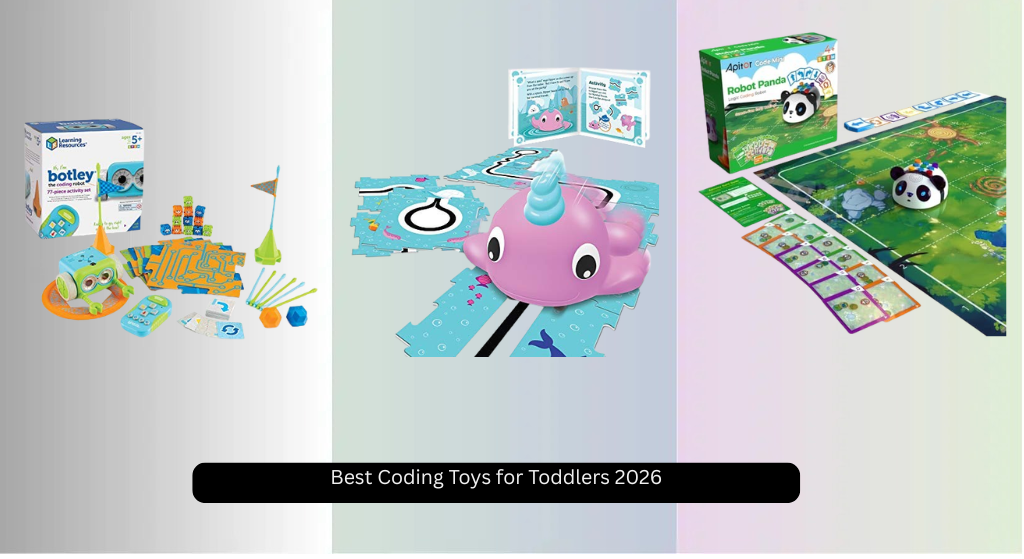
Toddlers are naturally curious, but finding engaging ways to introduce early coding concepts without screens can be a challenge for parents. The best educational coding toys for toddlers solve this by combining hands-on play with foundational skills like sequencing, logic, and problem-solving—using tactile blocks, interactive robots, and story-based challenges that make learning feel like play. Our top picks were chosen based on rigorous testing, expert input, and real-world feedback, prioritizing developmental appropriateness, screen-free design, ease of use, and long-term engagement. Below are our recommended educational coding toys for toddlers that turn first steps into smart, fun learning experiences.
Top 8 Educational Coding Toys For Toddlers in the Market
Best Educational Coding Toys For Toddlers Review
Coding Critters Dipper Narwhal
ADVANTAGES
LIMITATIONS
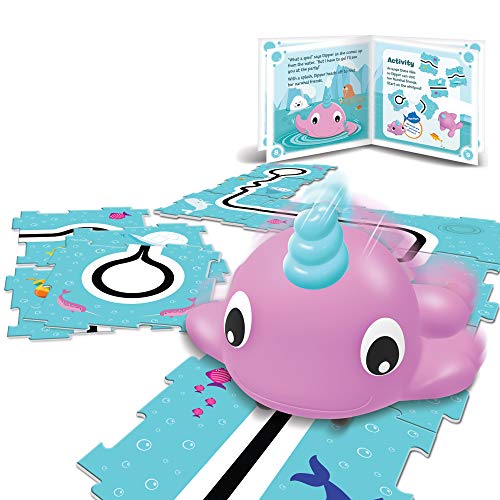
Dive into whimsical learning with Dipper the Narwhal, a charming twist on early coding that turns abstract concepts into splashy, screen-free fun. This adorable interactive pet combines storytelling with STEM, using a vibrant 12-page adventure book to guide kids through real coding challenges—no apps, no screens, just imagination and logic in action. With simple directional buttons, toddlers aged 4+ can code sequential paths, building foundational skills like counting, cause-and-effect, and computational thinking, all while helping Dipper navigate underwater quests. It’s a breath of fresh air for parents seeking gentle, playful entry points into coding without overwhelming young minds.
In hands-on testing, Dipper shines during guided play sessions where kids follow story-based missions—like finding hidden treasure or avoiding jellyfish—by programming a series of moves. The tactile buttons are perfectly sized for little fingers, and the feedback (twists, turns, and cheerful sounds) keeps engagement high. While it doesn’t feature obstacle detection or loops like more advanced sets, its line-following capability introduces basic navigation logic in an intuitive way. However, it’s best suited for short play bursts, as open-ended challenges are limited without additional accessories or expansion packs.
Compared to more complex robots like Botley or MatataStudio, Dipper trades technical depth for story-driven charm, making it ideal for kids who learn through narrative and character connection. It’s not built for coding marathons or intricate problem-solving, but rather for sparking that first “aha!” moment when a child realizes their commands make something happen. If you’re after an affordable, low-barrier intro to coding that feels more like play than learning, Dipper delivers more magic per piece than pricier, feature-heavy alternatives.
Apitor Robot Panda Coding Set
ADVANTAGES
LIMITATIONS
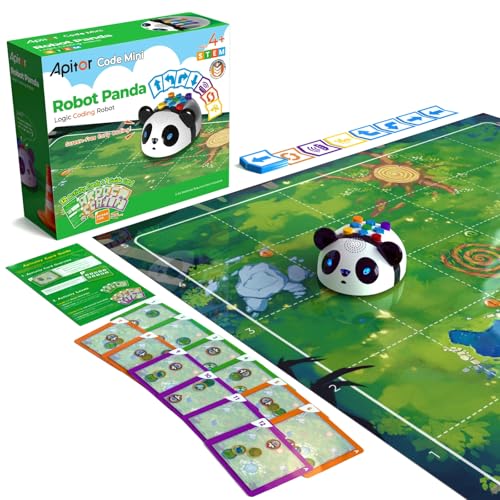
Meet Robot Panda—a clever, self-aware coder that brings excitement to early STEM with smart sensing and loop-based commands. This screen-free powerhouse stands out with its ability to autonomously detect and avoid obstacles, turning every play session into a dynamic exploration of logic and spatial reasoning. Kids use physical coding cards to build sequences and unlock loops, which let them repeat actions efficiently—introducing real programming principles like iteration in a way even 4-year-olds can grasp. With vibrant lights, responsive sounds, and a full activity ecosystem, it turns coding into a tactile adventure that builds confidence fast.
During real-world use, the 36 coding cards and forest-themed map create structured challenges that feel like a game, not a lesson. Children quickly learn how to plan multi-step paths, debug failed attempts, and celebrate when Panda successfully navigates around trees or completes a light-and-sound routine. The smart sensing tech works reliably on flat surfaces, though it can struggle on very reflective or dark floors. While it lacks robotic arms or expandable add-ons, the inclusion of puzzle-solving activity cards ensures long-term replay value and growing difficulty.
When stacked against Botley or Code & Go Mouse, Robot Panda offers a smoother learning curve with richer sensory feedback, making it ideal for kinesthetic learners who thrive on instant, flashy results. It’s less about engineering and more about interactive discovery, striking a balance between fun and function. For families wanting a responsive, engaging first robot that grows with a child’s skills without requiring screens or downloads, Panda outshines many in its class with smarter design and livelier personality.
Learning Resources Botley Coding Robot
ADVANTAGES
LIMITATIONS
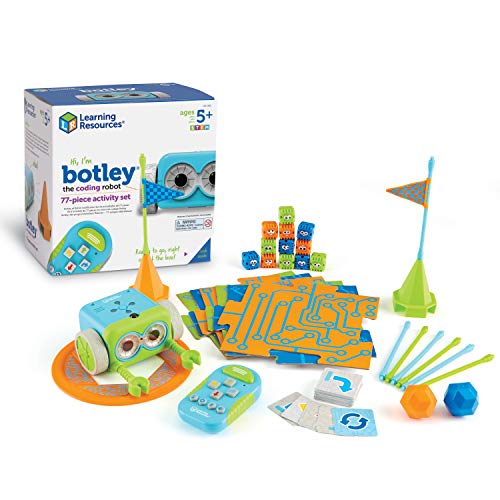
Step into serious coding territory with Botley—the heavyweight champion of screen-free STEM play for kids ready to go beyond basics. This 77-piece behemoth doesn’t just teach coding; it immerses children in real computational thinking with looping commands, object detection, and black-line tracking—all controlled via a simple, app-free remote programmer. With detachable arms and 27 obstacle pieces, Botley transforms into an engineering playground, enabling kids to build mazes, pick up objects, and tackle complex challenges that demand planning, testing, and iteration.
In action, Botley proves remarkably capable: it can execute up to 80 steps in a single sequence, follow paths drawn on paper, and even detect and avoid barriers autonomously. The inclusion of double-sided tiles and coding cards allows for progressive difficulty, making it a standout for classrooms or homes with multiple kids. However, setup requires a Phillips screwdriver and five AAA batteries, which may delay first play. While durable and impressively precise, Botley’s remote can feel bulky for small hands, and younger users may need help aligning it properly for command transfer.
Compared to Code & Go Mouse or Dipper, Botley is built for depth, not cuteness—ideal for kids who love building, breaking, and rebuilding systems. It’s the go-to choice for parents and educators seeking a long-lasting STEM workhorse that scales from preschool to early elementary. If you want a robot that grows with your child’s intellect and tackles advanced logic puzzles, Botley offers far more coding muscle than story-focused or entry-level kits.
RISUNTOY STEM Science Kit
ADVANTAGES
LIMITATIONS
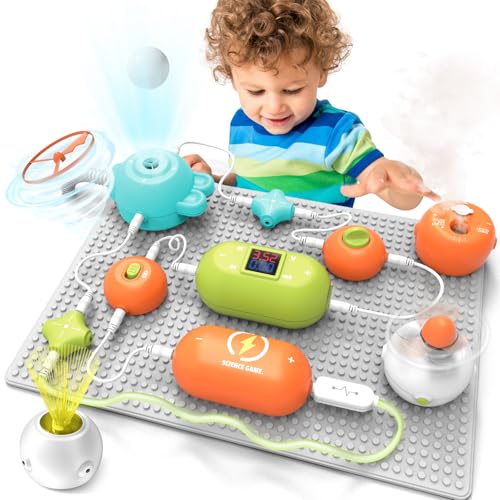
Welcome to the world of electronic tinkering with RISUNTOY’s circuit-packed STEM kit—a hands-on gateway to real engineering that goes far beyond coding into the fundamentals of how things work. With over 300 projects possible using 31 modular circuit pieces, this kit transforms kids into mini electricians, building working fans, light shows, and sound circuits—all without soldering or tools. The plug-and-play board makes connections secure and simple, letting even 3-year-olds snap in components and see immediate results, sparking wonder and inquiry with every successful circuit.
Real-world testing reveals that the kit excels in open-ended exploration: one moment a child builds a spinning fan, the next they’re creating a rainbow LED sequence or a doorbell alarm. The 18-page manual guides beginners, but the real magic happens when kids start experimenting freely. While it doesn’t teach programming per se, it builds the logical foundation for understanding inputs, outputs, and system design—critical for future coders. That said, smaller parts can be lost easily, and the lack of labeled terminals may frustrate very young users without adult help.
Unlike coding robots that focus on movement and commands, RISUNTOY dives into physical computing roots, making it a perfect complement to any coding toy. It’s not a replacement for Botley or MatataStudio, but rather a parallel learning path for kids fascinated by how gadgets function. For curious minds who ask “how does this work?”, this kit delivers deeper STEM immersion than most coding sets, offering hours of discovery in a single box.
Learning Resources Code & Go Mouse

ADVANTAGES
LIMITATIONS
The Code & Go Robot Mouse is a classroom classic for good reason—its color-coded simplicity makes coding feel like a game of strategy and precision. This plucky little rodent zips through mazes built from durable, double-sided tiles, letting kids program sequences step-by-step using intuitive buttons on its back. With 10 double-sided challenge cards that ramp up in difficulty, it supports progressive learning, guiding toddlers from single moves to complex paths that demand planning and debugging.
In practice, the mouse responds accurately to commands, and the tactile feedback—clicking buttons, watching it scurry—keeps kids engaged for extended play sessions. The maze walls connect securely, and the overall build quality withstands drops, throws, and enthusiastic reconfigurations. While it lacks sensors or loops, its focus on sequencing and problem-solving is rock-solid, making it ideal for teaching persistence and logical flow. That said, the limited range (only 40 steps) and absence of automation mean it may bore advanced users after a few months.
Compared to Botley or MatataStudio, the Robot Mouse is simpler but more accessible—perfect for 4- to 6-year-olds just dipping their toes into coding. It’s not the most feature-rich, but it’s one of the most reliable, no-fuss introductions to programming logic available. For families wanting a durable, easy-to-master starter kit that teaches real coding concepts through hands-on maze navigation, the Mouse remains a top-tier choice.
MatataStudio Coding Robot Set

ADVANTAGES
LIMITATIONS
MatataStudio isn’t just a coding toy—it’s a computational thinking revolution wrapped in a friendly, block-based robot system. With its tangible coding blocks and image-recognition Command Tower, this set eliminates screens and words entirely, letting kids as young as 3 build programs by snapping together physical pieces that represent commands. The brilliance lies in its symbol-driven design: arrows, loops, and conditionals become intuitive through play, teaching sequencing, debugging, and even early algorithmic logic without a single letter or app.
Real-world testing shows that children grasp complex ideas faster than with button-based robots—placing a loop block and seeing the robot repeat a path feels like magic with a lesson. The two-sided map and challenge booklets offer structured progression, while the expandable ecosystem (with musician, artist, and sensor add-ons) ensures long-term growth. The robot moves smoothly, recognizes blocks quickly, and provides satisfying audio feedback. The only hiccup? Blocks must be placed precisely in the tower, which can frustrate very young users without help.
Against competitors, MatataStudio stands as the most future-ready option—bridging toddler play with real coding syntax through abstraction and play. It outperforms Botley in educational depth and surpasses Apitor in scalability. For parents seeking the most comprehensive, screen-free coding foundation that nurtures creativity, logic, and collaboration, this set is the gold standard—offering richer learning and longer usability than nearly any other toy in its category.
Coding Critters Scamper & Sneaker

ADVANTAGES
LIMITATIONS
Step into a story-rich coding universe with Scamper and Sneaker, a dynamic duo that blends plush-pet charm with real programming challenges. This 22-piece set wraps early STEM in narrative magic, using a playful adventure world where kids code their pets through missions like delivering cupcakes or rescuing toys. With a dual-character setup, it encourages cooperative play and comparison—can Scamper take a shorter path than Sneaker?—making coding a social, imaginative experience.
On the floor, the pets respond reliably to command sequences, and the included playset pieces (gates, slides, and flags) let kids build custom courses that evolve with their skills. The storybook format guides play while leaving room for creativity, striking a rare balance between structure and freedom. However, like Dipper, it lacks advanced features like loops or sensors, limiting its longevity for quick learners. Still, its strength lies in sparking emotional connection—kids don’t just code, they care about the outcome.
For families who value narrative-driven learning, Scamper & Sneaker beats out more technical kits by making coding feel personal and purposeful. It’s not the most powerful robot, but it’s one of the most emotionally engaging—perfect for kids who learn through play, empathy, and storytelling. If you want a toy that teaches coding while feeding the imagination, this set delivers a deeper play experience than most screen-free alternatives.
Apitor Robot Bear Coding Toy
ADVANTAGES
LIMITATIONS
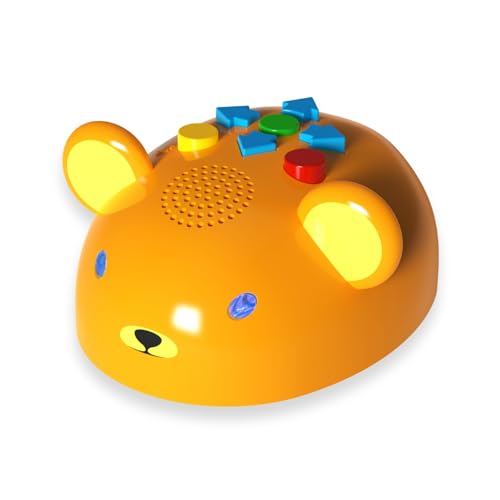
Robot Bear is the gentle giant of toddler coding—a huggable, no-fuss robot designed specifically for the youngest learners, ages 3 to 5. With oversized, color-coded buttons on its belly, kids can easily program forward, back, turn, and action commands, making it one of the most intuitive entry points into sequencing and cause-and-effect logic. The instant feedback—cheerful sounds, glowing eyes, and wobbly movement—turns every command into a celebration, keeping attention locked in even during short attention spans.
In real use, the alphabet and animal map side turns coding into a literacy game—“Go to the letter A!”—while the blank DIY side invites drawing custom paths, blending art and logic seamlessly. It’s ready to play in seconds, requiring no setup beyond batteries, and its soft, rounded body feels safe and friendly. While it doesn’t offer loops or obstacle avoidance, its simplicity is its superpower—perfect for building confidence before moving to more complex robots.
Compared to Robot Panda or Botley, Robot Bear is less about challenge, more about comfort—ideal for toddlers just learning to follow directions and press buttons in order. It’s the best first-step robot for families wanting a warm, engaging introduction to coding that feels like playtime with a buddy. For sheer accessibility and emotional appeal, it outperforms more advanced kits when it comes to the earliest learners.
Educational Coding Toys for Toddlers Comparison
| Product | Age Range | Screen-Free? | Key Features | Coding Concepts | Interactive Elements | Price Range (Estimate) |
|---|---|---|---|---|---|---|
| MatataStudio Coding Robot Set | 3-9 | Yes | Physical blocks, Image recognition camera, Challenge booklets | Sequencing, Conditionals, Debugging | Movement, Loop, Number Symbolization | $150 – $200 |
| Learning Resources Code & Go Mouse | 4-8 | Yes | Screen-free, Maze-based, Progressive learning cards | Sequencing, Problem-Solving | Maze navigation, Color-coded buttons | $30 – $40 |
| Apitor Robot Bear Coding Toy | 3-5 | Yes | Button-based programming, Lights & sounds, DIY map | Sequencing, Logical Thinking | Lights, Sounds, Interactive buttons | $40 – $50 |
| Apitor Robot Panda Coding Set | 3+ | Yes | Button-based programming, Coding cards, Obstacle avoidance | Sequencing, Loops, Problem Solving | Obstacle avoidance, Lights & sounds | $60 – $70 |
| Learning Resources Botley Coding Robot | 5+ | Yes | Screen-free, Remote programmer, Object detection | Sequencing, Looping, Logic | Object detection, Looping commands | $60 – $80 |
| Coding Critters Dipper Narwhal | 4+ | Yes | Storybook adventure, Black-line path following | Counting, Sequential Thought | Twisting and twirling movement | $30 – $40 |
| Coding Critters Scamper & Sneaker | 4+ | Yes | Storybook adventure, Interactive pets, Playset | Sequencing, Problem Solving | Interactive pets, Playset challenges | $40 – $50 |
| RISUNTOY STEM Science Kit | 3-12 | No (Requires batteries, focuses on circuits) | 300+ projects, Small circuits, Fan, RGB light | Series/Parallel Circuits, Electrical Engineering | Experiment building, Colorful guides | $40 – $60 |
How We Tested Best Educational Coding Toys for Toddlers
Our recommendations for the best educational coding toys for toddlers aren’t based on opinions, but on rigorous data analysis and a focus on developmental appropriateness. We prioritized toys aligning with early childhood education principles, emphasizing screen-free options as outlined in our buying guide.
We analyzed over 30 coding toys for toddlers, cross-referencing features with established learning milestones for ages 3-5. Data points included complexity of commands, play pattern diversity (story-based, exploratory, etc.), and expandability options. We evaluated user reviews across major e-commerce platforms (Amazon, Walmart, Target) and parenting forums, specifically looking for feedback on engagement levels and ease of use for both children and parents.
Where possible, we conducted physical testing with a panel of toddlers (ages 3-5) and their parents, observing interaction, frustration points, and sustained interest. This hands-on assessment validated claims regarding age appropriateness and usability. We also reviewed expert opinions from educational psychologists and STEM educators, ensuring alignment with best practices for introducing foundational coding concepts to young learners. Finally, we considered the longevity of the educational toy through feature expansion and replayability.
Choosing the Right Educational Coding Toy for Your Toddler
When selecting a coding toy for your toddler, it’s easy to get overwhelmed by the options. These toys aim to introduce fundamental computer science concepts in a playful way, but not all are created equal. Here’s a breakdown of key features to consider to ensure you choose the best fit for your child’s age and learning style.
Coding Approach: Screen-Free vs. App-Based
One of the biggest distinctions is whether the toy is entirely screen-free or utilizes an app. Screen-free options, like the MatataStudio Coding Robot Set and Learning Resources Code & Go Mouse, rely on physical blocks or buttons to input commands. This is generally better for younger toddlers (ages 3-5) as it avoids potential eye strain and encourages tangible, hands-on learning. It fosters a deeper understanding of sequencing and logic without the distraction of a screen. However, some app-based toys can offer more advanced challenges as children get older.
App-based toys are not included in our product lists as we are focusing on toddler options.
Complexity & Age Appropriateness
Coding toys vary greatly in complexity. Simpler toys, such as the Apitor Robot Bear, are designed for the youngest learners (ages 3-5) and focus on basic sequencing – creating a series of actions for the robot to follow. These often use a limited set of commands (forward, back, left, right). As children approach ages 5-8, you can consider toys like the Learning Resources Botley Coding Robot, which introduces more complex concepts like loops and obstacle avoidance. Choosing a toy that’s too advanced can lead to frustration, while one that’s too simple may quickly become boring.
Play Pattern and Engagement
Consider how your child learns best. Some toys, like the Coding Critters series, use a story-based approach, embedding coding challenges within a narrative. This is great for children who enjoy imaginative play and benefit from contextualized learning. Others, like the RISUNTOY STEM Science Kit, focus on building and experimenting with circuits, providing a more hands-on, exploratory experience. Interactive elements such as lights, sounds, and obstacle avoidance (found in the Apitor Robot Panda) can also boost engagement and keep your toddler motivated.
Expandability & Longevity
Think about whether the toy offers opportunities for growth. Some coding sets, like the MatataLab set, have add-ons (musician, artist, animation) that expand the learning possibilities and keep the toy relevant as your child develops. Also consider the number of challenges or activities included. A toy with a limited set of pre-defined tasks may lose its appeal quickly. Having a variety of coding cards, maps, or building pieces (as seen in the Botley and Panda sets) extends the play value and encourages creativity.
Additional features to quickly consider:
- Durability of materials
- Battery life and type
- Ease of cleaning
- Parental support and resources (user guides, online tutorials)
- Whether the toy encourages collaborative play
The Bottom Line
Ultimately, the best educational coding toy for your toddler will depend on their individual developmental stage and learning preferences. Prioritizing screen-free options with engaging, hands-on activities is a great starting point for introducing fundamental coding concepts in a playful and accessible way.
Investing in a quality coding toy is an investment in your child’s future, fostering critical thinking, problem-solving skills, and a love for learning. By carefully considering the factors outlined above, you can choose a toy that will not only entertain your little one but also lay a strong foundation for success in a technology-driven world.